• Home
  • About
    • F.A.Q.
    • Applause
  • Samples
  • Work with Me
    • Copywriting
    • Pet Marketers
  • Blog
  • Members
  • Contact Me

Jen Phillips April

Your Online Marketing Partner with SEO Copywriting and Social Media Marketing

  • Home
  • About
    • F.A.Q.
    • Applause
  • Samples
  • Work with Me
    • Copywriting
    • Pet Marketers
  • Blog
  • Members
  • Contact Me

How to Schedule Your Facebook Posts

August 5, 2012 by Jen Phillips April

Schedule posts on Facebook

Facebook is finally making it easy for us to schedule posts  through Facebook itself.  Here’s how to do it.

1)      Go to your Business Page and type something in the box.  You’ll see a clock in the lower left.
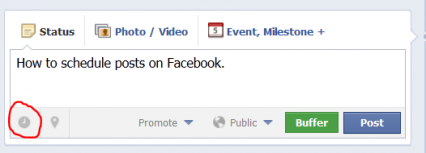
How to Schedule Posts on Facebook
Scheduling Posts Just Got Easier


2)      Click on the clock icon and it’ll give you a link to “add year”.  Click on that, you’ll get a drop down menu with years.  Choose the one you want to use.

Add year for Facebook posts
The Clock Asks You to Add the Year


3)      Then, it will prompt you to add the month. Next, it will prompt you to add the day and finally the time.

Add Month, Day and Time for Facebook Posts
Add Month, Day and Time


Scheduling messages can be a tremendous time saver.

Not only can you schedule in batches, but you can schedule it for times when it’s most likely to be seen by your audience rather than when it’s convenient for you.

When to Post

Statistics show people are on Facebook after typical work hours and on the weekend.

So, if you post at 3:00 on a Monday, you’re limiting your audience.  However, if you post at 10:00 at night, more people will see your post.

Best times to post vary by audience so you’ll have to experiment.  Facebook tells you how many people saw your post, so use that as a guide as you post at different times.

Scheduling directly into Facebook rather than using Hootsuite or another 3rd party scheduling tool,  will benefit you because Facebook will give your posts a higher ranking.  This means more of your audience will see your post.

Scheduling messages is not an option for personal pages at this time.

For more tips

Filed Under: Social Media Tagged With: bucks county social media, Facebook, Social Media for Marketing 101

Let’s Get Social

Clients Include:

Barkleigh Productions

American Writers & Artists Institute

Smarttvel - Travel Smart

Seer

Official Payments Corp

Leadit Marketing

International Living

Day Smart Software

Training

Jen_Speaker_trainerJen's seminars focus on helping organizations develop their social media strategy and create action items around it. Whether showing business owners the best practices of Facebook posts or how to optimize your LinkedIn headline, Jen is passionate about the social media revolution. Her engaging, conversational style keeps audiences coming back for more. One FAQ is, “When are you doing another class?” and dozens have become regulars at her small social media trainings. Check out her training...

Social Media Help

Jen_social_mediaThese in-person training seminars focus on you and what steps to take to maximize the power of social. Whether you need help crafting great content or connecting the ROI to your bottom line, Jen can help. Read More

Writing

Jen_CopywritingCopy is more than words on a screen. It’s a sales tool. It educates, informs and invites your reader to do something. Does yours? Check how it's done here

Home | Articles | About | Training | Services | Coaching |Contact | Terms & Conditions | Privacy


© Copyright 2012-2026 by JenPhillipsApril.com · All Rights Reserved · Built on the Genesis Framework